Pdf to PowerPoint Converter
Okdo Pdf to PowerPoint Converter converts PDF into PowerPoint directly on your Windows PC. Process whole folders in one batch. Everything runs offline, so your files never leave your computer, and you don't need Adobe Acrobat or Reader to get clean, layout-accurate results. In addition, it can password-protect or unlock PDFs.
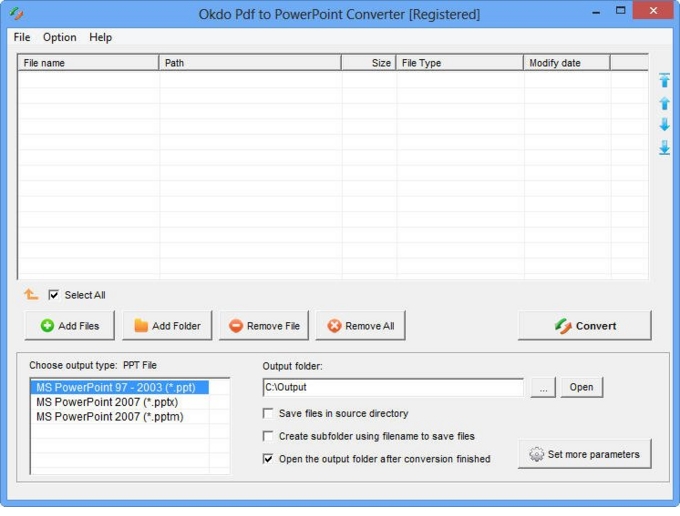
Key features
Advanced capabilities
- ✓Okdo Pdf to PowerPoint Converter doesn't need Adobe Reader or Acrobat to be installed.
- ✓Supports password protected pdf files conversion by entering the password.
- ✓Simultaneously convert massive pdf format files to one certain format file once to save your time.
- ✓Supports extract the character from pdf to powerpoint document.
- ✓Adjust the slide size and orientation.
- ✓Use the image as the PowerPoint background.
- ✓Convert one multipage pdf to one multipage PowerPoint.
- ✓Automatically adjust the image size to adapt the PowerPoint page.
- ✓Inserts footer text into slides.
- ✓Customize the output file name.
- ✓Add an entire folder for batch conversion.
- ✓Optionally opens the output folder automatically when conversion completes.
- ✓Saves output files to the same folder as the source files.
- ✓Saves each converted file to a separate subfolder within the output folder.
Supported formats
➡️ Input
Adobe
PDF *.pdf
⬅️ Output
MS Office Document
PowerPoint (*.ppt, *.pptx, *.pptm)
Why convert with Okdo
What customers say
We handle confidential client files, so Pdf to PowerPoint running 100% offline was the dealbreaker. Batch mode processes whole folders in one click.
As a Training Consultant, I needed something I could trust with sensitive documents. Pdf to PowerPoint delivered. No Adobe Acrobat dependency to install or maintain.
It handled our password-protected PDFs without any drama. Files never leave the PC — ideal for compliance.
Converted a 300-page document in seconds. Free updates are included with the license.
Layout and formatting came through perfectly — no broken tables or images. Batch mode processes whole folders in one click.
We bought the one-time license and never looked back — no subscription, free updates. Runs entirely offline, no internet connection required.