Word PowerPoint to Swf Converter
Okdo Word PowerPoint to Swf Converter converts Word and PowerPoint into SWF directly on your Windows PC. Process whole folders in one batch. Everything runs offline, so your files never leave your computer.
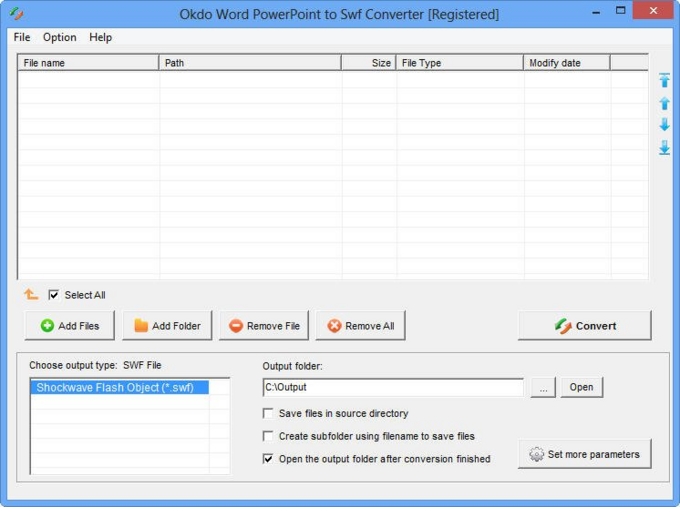
Key features
Advanced capabilities
- ✓Simultaneously convert massive different format files to swf video format file once to save your time.
- ✓Convert Ppt/Pptx/Pptm format files to swf with preserving the original text,image,layout etc.
- ✓Convert Doc/Docx/Docm/Ppt/Pptx/Pptm file content to multiple frames SWF.
- ✓Supports to convert each page of Word to one single file.
- ✓Adjust the image quality as needed.
- ✓Adjust the page size of the created SWF video.
- ✓Set the image transition interval.
- ✓Set the animation playback speed.
- ✓Stretch or shrink images to fill the SWF screen.
- ✓Zoom images by a scaling factor.
- ✓Customize the output file name.
- ✓Save list: Save the converted files to a reusable list.
- ✓Load list: Load a saved list and convert its files directly.
- ✓Add an entire folder for batch conversion.
- ✓Optionally opens the output folder automatically when conversion completes.
- ✓Saves output files to the same folder as the source files.
- ✓Saves each converted file to a separate subfolder within the output folder.
Supported formats
➡️ Input
MS Office Document
Word (*.doc, *.docx, *.docm)
PowerPoint (*.ppt, *.pptx, *.pptm)
⬅️ Output
Flash video *.swf
Why convert with Okdo
What customers say
Support replied within a day when I had a question about MS Office Document Word (*.doc → Flash video *.swf. Smooth experience overall.
Converted a 300-page document in seconds. Handles encrypted and password-protected documents.
Great value for a one-time purchase. Batch mode processes whole folders in one click.
Layout and formatting came through perfectly — no broken tables or images. Runs entirely offline, no internet connection required.
Compared three converters; Word PowerPoint to Swf was the only one that preserved our layout on MS Office Document Word (*.doc → Flash video *.swf. Runs entirely offline, no internet connection required.
It handled our password-protected PDFs without any drama. Preserves the original layout, fonts and images.